
GPSTimeServer - Dual Display
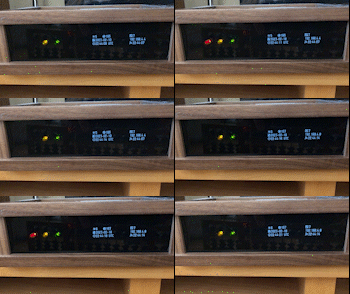
WiFi enabled GPS fed NTP server based on NodeMCU Amica and Arduino framework
This version adds a second OLED display to help verify that the server responds to the NTP requests. Every time an NTP request comes in from a client (i.e., a clock connected to the server's WiFi network) its IP address and the time the response was sent are shown on the OLED. It also shows the total number of clients that are connected. The second display is optional, the code posted here runs without it. However with multiple clocks it is a handy way to make sure they are all connected and being served. In server mode, ESP8266 microcontrollers can handle up to eight WiFi clients.
As on the original version, the first OLED display shows how many satellites are "in view" and the resolution of the position reported. It also shows the UTC time and date. The pushbutton switch disables or enables WiFi connectivity. The yellow LED indicates WiFi is enabled. The green LED indicates the GPS data is valid and the server's system time is in sync with it. The red LED pulses every second when GPS signals are present.
OLED displays can wear out if they are active all the time especially if they show information that does not change much. This version includes provision to turn the OLEDs off if nobody is there to see them. As suggested by Brett Oliver, a PIR motion sensor module can be connected to the ESP8266 to automatically turn on the OLEDs when someone is near and turn them off when they leave. A switch could be connected instead of the sensor if manual operation is desired. See below for more details.
The I2C address of the second OLED display has to be changed. For example with the recommended SSD1306 displays this means changing it from the default 0x78 to 0x7A. This is done by relocating a resistor on its circuit board. It is a tiny surface-mount part so it requires some delicate desoldering and resoldering. There is a graphic on the board that shows where the resistor should be placed to choose the new address.
The U8g2 library that the code uses works with many different OLED displays. You just need to use the constructor from the library and the I2C addresses that match the displays being used. For example SH1106 modules could also be used. Constructors for SH1106 modules are included in the definitions.h file. To use them comment out the SSD1306 constructors and uncomment the SH1106 constructors. The I2C addresses specified in the code may also need to be changed to 0x3C and 0x3D.
To use this server, set your clock to connect to WiFi using the SSID and password specified in the definitions.h file. Then set the IP address for the time server it calls to 192.168.4.1. That is the address an ESP8266 uses when it's in server mode. The server will assign IP addresses to clients on its network starting with 192.168.4.2.
It is highly recommended to use PlatformIO to compile and edit the code. That way all the libraries needed will be downloaded and installed automatically. It is free like the Arduino IDE. However PlatformIO has more professional features that make it easier to develop a project like this once you get the hang of using it. All the files needed for this project have been provided. The code is in two files: definitions.h is in the "includes" directory and main.cpp is in the "src" directory. The platformio.ini file is also provided.
A custom enclosure was built for the server using walnut and acrylic.


Parts list:
- Amica NodeMCU (ESP8266 / ESP-12 E)
- DS3231 RTC
- Neo-6m V2 GPS
- 0.96" OLED Display (SSD1306 or similar. If two are used be sure that it is possible to change the I2C address on one of them.)
- Hi-Link 5V/3W
- Mini-360 DC-DC Buck converter
- TP4056 Module (optional for portable use)
- 18650 battery holder (optional for portable use)
- HC-SR501 PIR motion sensor module or SPDT switch (both are optional)
- Red, Green and Yellow LEDs
- Resistors (150, 100 and 150 Ohms respectivelly for above leds)
- Momentary push button switch
 ATTENTION
Several DS3231 modules being sold today contain a hazardous design flaw in which it supplies a voltage to the battery cradle regardless if it came with a rechargeable battery or not. If it came with a CR2032 battery (non-rechargeable) the consequence is that it will swell, explode, or worse. If it came with a LIR2032 battery (rechargeable), the module being fed with 5v will generate an unsafe charging voltage for that battery.
There are workarounds for that so you do not need to toss your module away, the most popular being removing a diode and/or resistor.
There is a long discussion on the thread below about root cause and possible fixes:
https://forum.arduino.cc/t/zs-042-ds3231-rtc-module/268862/33
Libraries:
- paulstoffregen/Time@^1.6
- makuna/RTC@^2.3.5
- mikalhart/TinyGPS@0.0.0-alpha+sha.db4ef9c97a
- olikraus/U8g2@^2.28.8
Source code based on:
Wiring diagrams
This time server does not have to be portable so it is AC powered only.
A PIR motion sensor can be connected to A0 on the NodeMCU to automatically turn the OLED displays on only when someone is near to see them. Thanks to Brett Oliver who engineered the mod on his version of the project. Alternatively, an SPDT switch that connects A0 to either ground or +3.3 volts could be used. If it is not desired to turn the displays off, just connect A0 permanently to +3.3 volts or comment out the "if (PIRvalue < 500)" block of statements in the main.cpp file.
Schematic diagram

Breadboard layout

Optional AC/DC power supply

A printed circuit board was designed and fabricated for the project. The Gerber files for the board are in the resources folder.

Here are a couple of photos of the inside of the project. This version doesn't have to be portable so it's AC powered and the battery power supply wasn't implemented. It also uses a toggle switch instead of a motion sensor to turn the displays on and off. The push button switch enables or disables the WiFi.


CAD drawing for the enclosure

More information about the time server project can be found here:
https://www.linkedin.com/pulse/iot-maker-tale-stratum-1-time-server-built-from-scratch-monteiro/